
I finally got tired of fighting slide handouts.
Most weeks, my classes publish a PDF of lecture slides. Like a lot of people, I prefer printing them 3-up so I can take notes alongside the slides. PowerPoint and Google Slides technically support this, but they always force a lined notes section onto the page. The lines cannot be removed, resized, or turned off.
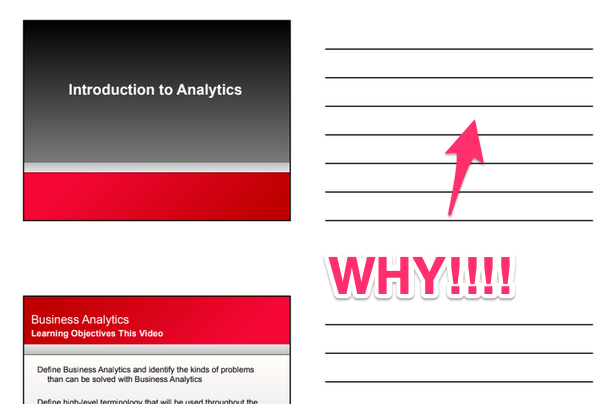
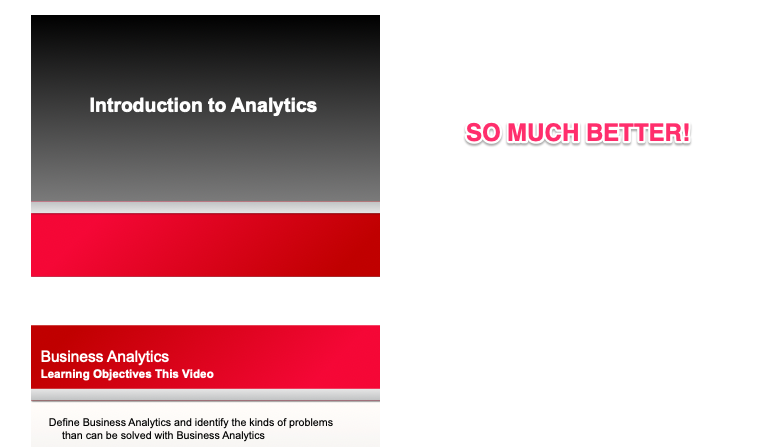
That sounds minor until you actually try to use it. The lines waste space, make diagrams awkward, and get in the way when you want to sketch, write equations, or just jot thoughts freely. What I really wanted was simple. Three slides per page, and a big blank area next to them. It makes it easier to annotate if printed, on an iPad, etc.
Surprisingly, most tools make that difficult. The odd thing is pretty much all the other handout options (2, 4, 6 etc) in PowerPoint and Google Slides do not have these lines. It’s only the 3 up. I like the size of the 3 up – easy to see details still in the slide and room for my notes.
After one too many attempts of exporting, re-importing, tweaking layouts, or messing with PDF editors, I decided to stop fighting the tools and write something small that did exactly what I wanted.
The result is a short Python script that:
- Takes slide PDFs
- Lays them out 3-up on US Letter pages
- Puts the slides on the left
- Leaves the right side completely blank for free-form notes
- Runs in one command
I drop weekly slides into a folder, run the script, and print the output. No UI, no templates, no manual cleanup.
The code itself was developed collaboratively with ChatGPT. I defined the workflow and constraints, and ChatGPT wrote the code – and then I tweaked it until it matched what I had in my head (mostly just slide size, directories…)
It is not a big project, and it is not trying to be clever. It just removes friction from something I do every week. Those are often the best kinds of tools.
If you are dealing with the same annoyance, the project is published on GitHub here: